Family tree for a school project: ideas and tips
A family tree project helps children understand generations, relationships and where their family comes from. This guide covers the simplest layouts, what to include, ideas for every age, and how to make the project work for every kind of family.
By the Family Tree Studio team · Published · Updated · Checked against the editor it describes
1. Choose a layout
Most school assignments ask for three generations: the student, their parents and their grandparents. There are three easy ways to make one:
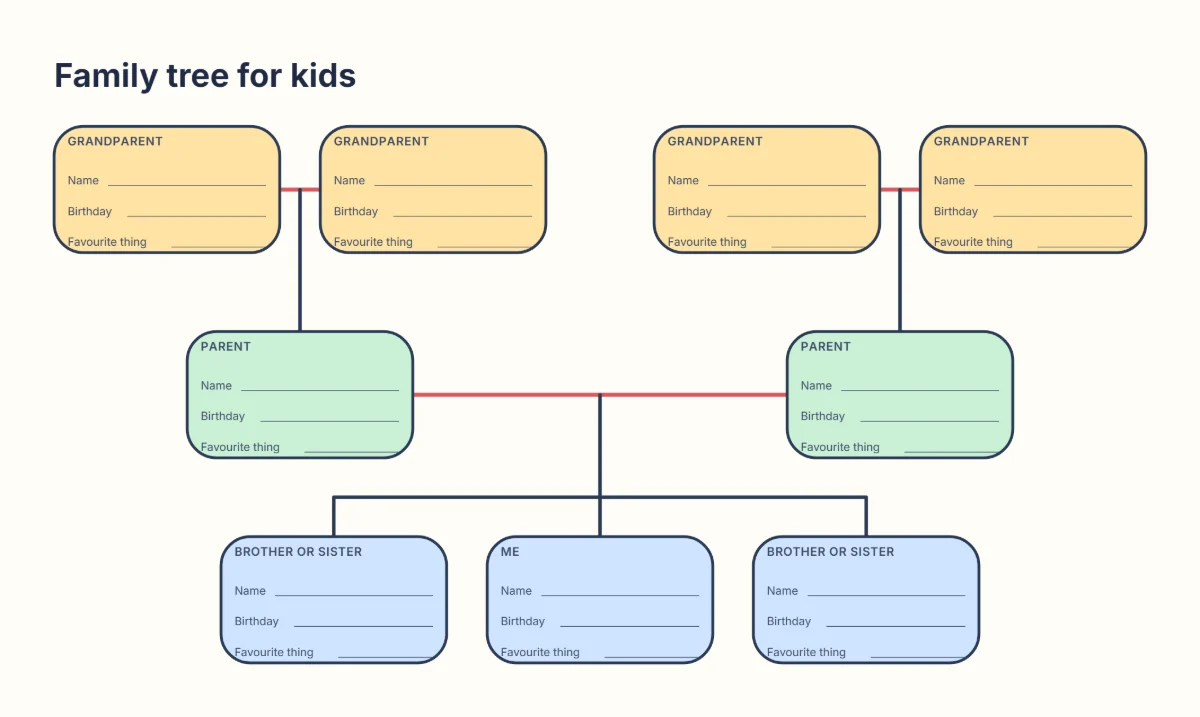
- The family tree for kids template: “Me” and up to two brothers or sisters, two parents and four grandparents, with big boxes for drawings. Print the blank PDF and fill it in by hand.
- The three-generation family tree: a simple chart of the student, two parents and four grandparents, for older children.
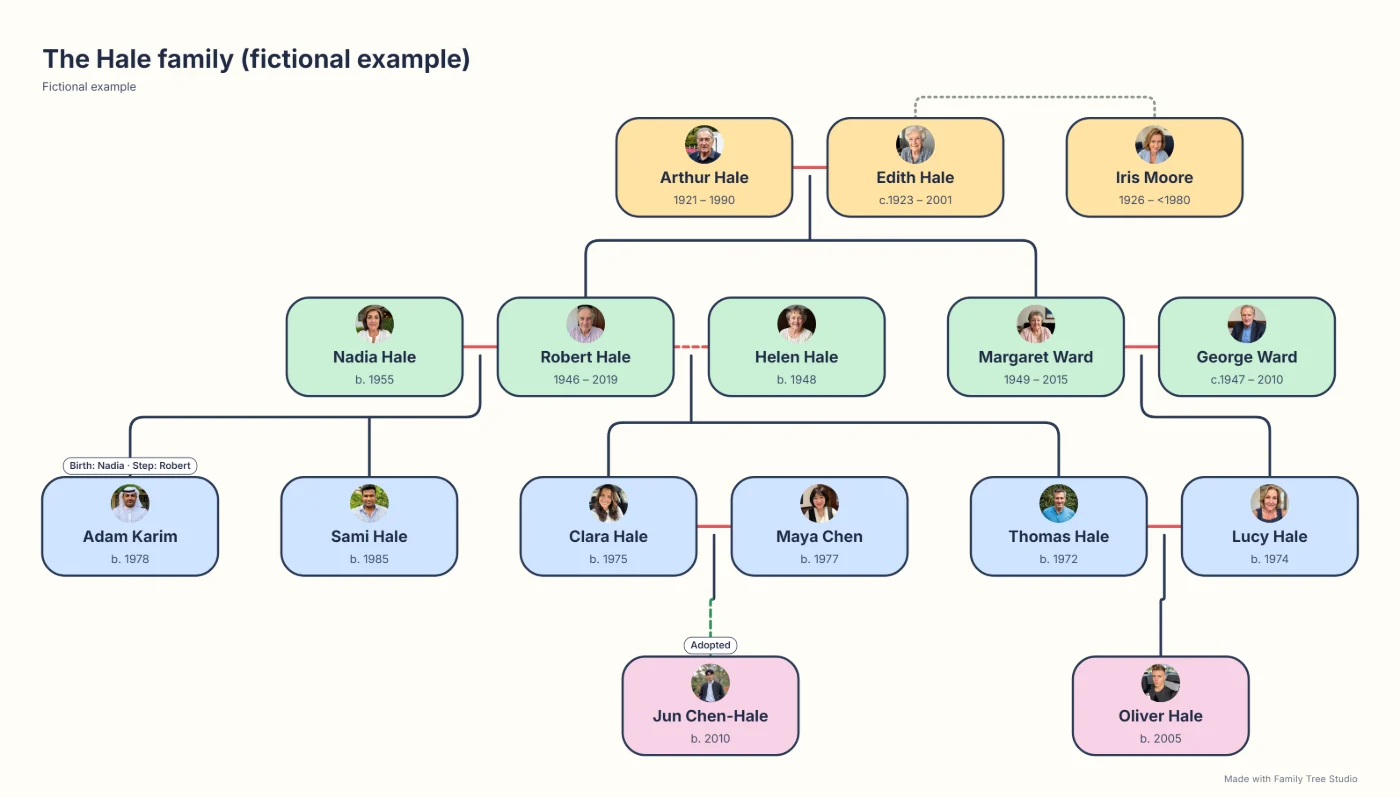
- Make it online: type names into the family tree maker, add photos, and print it in the colourful Kids / Classroom style. Best when the family does not fit a fixed set of boxes.
2. Step by step
- Read the assignment. Check how many generations, what details and what size the teacher expects, and whether it will be displayed.
- Make a list of names. Start with the student, then parents, brothers and sisters, then grandparents.
- Interview a grandparent or older relative. Ask where they grew up, what school was like and what jobs people did. It is often the part children remember most.
- Fill in the tree. In pencil on a printed template, or online, where mistakes are easy to fix and every change can be undone.
- Decorate it. Add photos or drawings, colours for each side of the family, and a title such as “The Khan family tree”.
- Print and present. Download a PDF on A4 or US Letter, or A3 for a poster, and practise saying one fact about each person.
3. What to include
Keep it simple. For each person, a first name is enough; add more if the assignment asks:
- First name, and surname if it differs from the student’s
- Birth year or birthday (just day and month for living people on display)
- Where they were born or grew up
- A job, hobby, favourite food or a fun fact
- A photo or a drawing
For trees that will hang on a classroom wall, leave out full birth dates, addresses and photos of people who would rather not be shown.
4. Family tree project ideas by age
Ages 5 to 7
- A drawn tree with the child’s handprint as the trunk and family names on the leaves.
- The kids template with a drawing in every box and one favourite thing per person.
- A “people who look after me” tree for children whose family does not fit the usual shape.
Ages 8 to 11
- Three generations with birth years and birthplaces, and a world map with pins for each place.
- A photo family tree printed in colour, with one sentence about each grandparent.
- An interview with a grandparent written up as a short “then and now” page.
Ages 12 and up
- Four or five generations using family papers and records, with a note of where each fact came from. See how to find your ancestors.
- A fan chart or pedigree chart of the student’s ancestors, plus a timeline of family events against world events.
- A short family video that reveals one generation at a time, downloaded from the editor for a class presentation.
- A family tree in two languages, for example with names in Urdu or Hindi and English. See the shajra nasab maker.
5. Every family belongs
Not every child lives with two birth parents or knows their birth family. A family tree project should never make a child feel their family is wrong or missing:
- Adoption and foster care: let the child choose which family to show, or both. In the editor, a parent can be birth, adoptive, foster or guardian, and adoptive parents are full parents in the tree.
- Step-families and single parents: include step-parents and half siblings if the child wants them; a child can have just one recorded parent.
- Two mums or two dads: the kids template says “parent”, not mum and dad, and the editor treats same-sex couples like any other couple.
- A parent who has died: they still belong in the tree. Include them with a date, a photo or a memory if the child wishes.
- Unknown relatives: empty boxes are fine. Nothing needs to be guessed.
6. Notes for teachers
- Offer alternatives such as a “people who care for me” tree, a family timeline or a tree for a historical or fictional family, and never require personal details.
- Give families notice and explain what will be displayed. First names and drawings are enough for a wall display.
- The blank kids template prints on A4 or US Letter, and children can make their trees online without accounts: everything is saved in their own browser, not on a server.
School family tree questions
How many generations should a school family tree have?
Three generations is the usual choice: the student, their parents and their grandparents. It fits on one page, can be finished in an evening, and still shows how generations connect. Older students can go back four or five generations as a research project.
What should I write in each box?
At minimum a first name. Many assignments also ask for a birthday or birth year, and a fun fact such as a favourite thing, a job or the place someone grew up. Leave out full birth dates and addresses of living people if the tree will be displayed.
What if my child is adopted or lives with one parent?
Let your child decide who belongs in the tree. Adoptive parents, step-parents, foster carers, grandparents who raise a child and two mums or two dads are all families. The kids template labels boxes “parent”, not mum and dad, and any box can stay empty.
Can my child make the family tree on a phone or tablet?
Yes. The editor works in the browser on phones, tablets and computers with no app to install and no account. Download the finished tree as a PDF to print, or as an image to send to the teacher.
How do I print a family tree in colour for school?
Choose the Kids / Classroom style and download a PDF on A4 or US Letter. It prints in colour on an ordinary inkjet printer and stays readable in black and white.
Is it free for schools and teachers?
Yes. The editor, the printable templates and all downloads are free, with no sign-up. Students’ trees are saved in their own browser, not on this website’s server.
Make the school family tree now
Print the free kids template, or type the names online and print a colourful family tree in minutes.