How to make a family tree
A practical order of work that avoids the usual problems: guessed names, children linked to the wrong parent, and a tree that is lost when a laptop is replaced. The screenshots are from this website’s editor, using a fictional family.
By the Family Tree Studio team · Published · Updated · Checked against the editor it describes
1. Collect what you already know
Before typing anything, spend half an hour gathering what is already in the house: birth, marriage and death certificates, funeral cards, old address books, the back of photographs and any family Bible. Then talk to the oldest relatives you can. Ask for names, places and roughly when, not exact dates: “she was born in Lahore just before Partition” is more useful than a guessed date.
Write down where each fact came from. When two sources disagree later, knowing that one came from a certificate and the other from memory settles it quickly.
2. Start with yourself
Open the editor and add yourself as the first person. Only a name is needed. Every other relative is added from someone already in the tree, so the tree grows outwards from a fixed point and nobody ends up floating unconnected.
3. Add parents, then work outwards
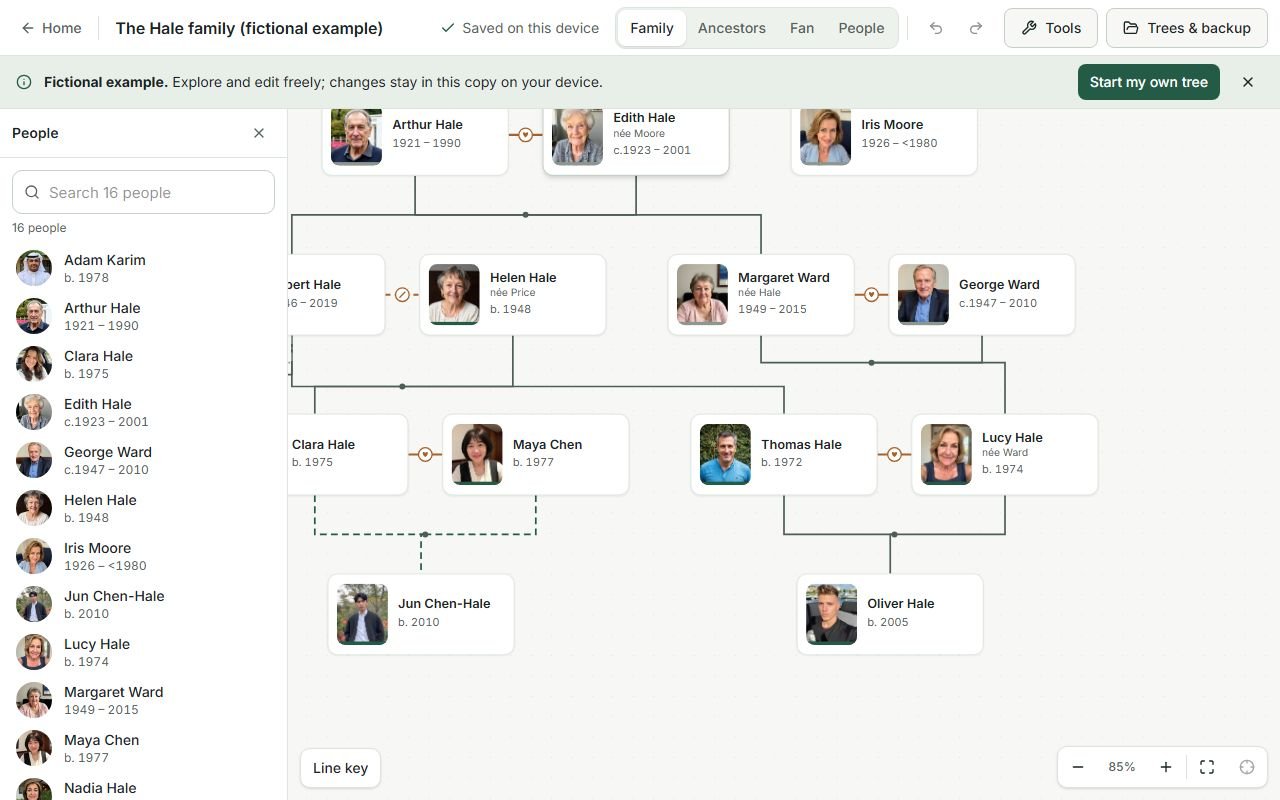
Select yourself and add your parents, then each parent’s parents. Going up one generation at a time keeps the tree correct. Brothers, sisters, partners and children can then be added around each person.
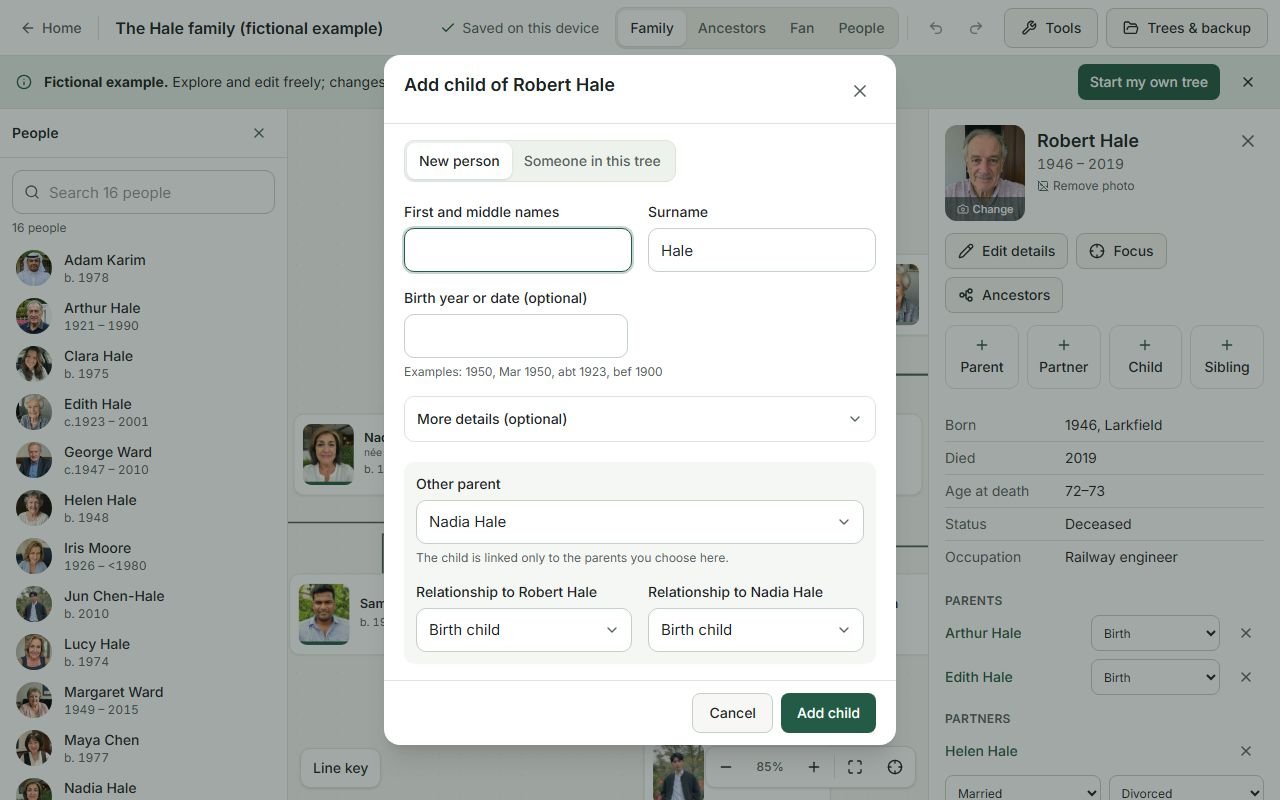
When you add a child to someone with more than one partner, the editor asks which parents the child has. This matters: a half brother and a full brother look the same on a hand-drawn chart but are different relationships.
4. Record complex families accurately
- Second marriages: add each partnership separately and mark an ended one as divorced, separated or widowed. Each child stays linked to their own parents.
- Adoption, fostering and guardians: choose the kind of parent link. Adoptive parents are full parents in the tree; the kind is shown on the line and kept in exports.
- Step-parents: a partner of a parent never becomes a parent automatically. Add a step link only if you want it shown.
- Same-sex couples and unknown parents: both are ordinary entries. A child can have one recorded parent.
5. Uncertain dates and missing people
Type dates as you know them: “1950”, “Mar 1950”, “abt 1923”, “bef 1900” or “bet 1900 and 1910”. They are stored exactly as written and still sorted correctly. Leave unknown names blank rather than inventing them; a blank box is an honest invitation for a relative to fill it in.
Mark people as living or deceased where you know. People marked living are hidden by default in shared links and can be hidden in exports.
6. Save, back up and share
Without an account, the tree is saved automatically in your browser on this device. That is private but fragile: clearing browsing data or changing computers loses it. Use Trees & backup → Download complete backup now and then; the single file contains everything, photos included, and opens in any browser.
If you create an account you can copy chosen trees to the website so they open on your other devices, keep version history and invite relatives to view or edit. A read-only link shows a preview first and hides living people by default.
When the tree is ready, see how to print a family tree, or start from a printable template.
7. Reading the lines and symbols
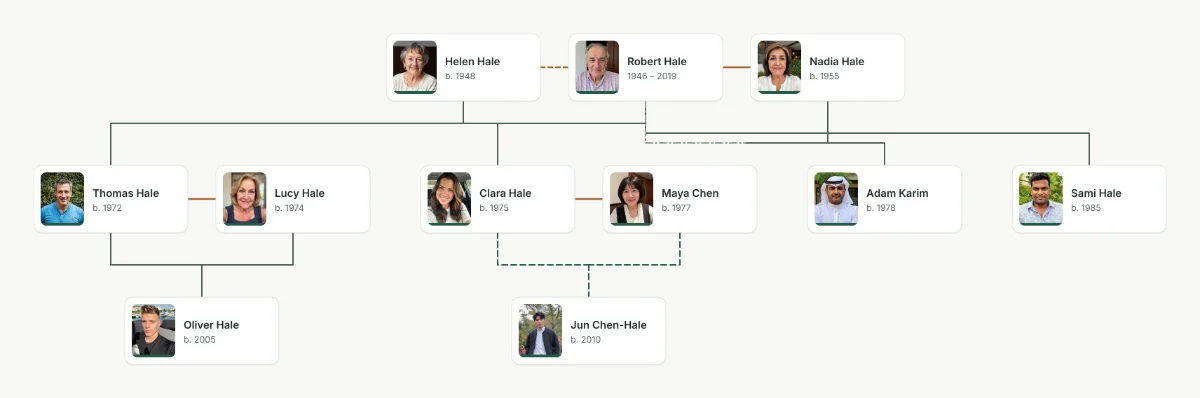
- A line between two people joins a couple. A dashed couple line means the couple divorced or separated; a widowed couple keeps a solid line.
- A line from a couple down to a row of children means those children have exactly those two parents. Children of another partnership hang from a separate line, so half siblings are never confused with full siblings.
- A dashed parent line with a label marks a step, adoptive, foster or guardian link instead of a birth link.
- “Same person ×2” on a pedigree or fan chart marks an ancestor who appears twice because two of their descendants married.
8. How far back should you go?
Three generations, from you to your grandparents, make a complete first tree and fit on one page. Four or five generations usually need family papers and public records; see how to find your ancestors. Making one for a class? Read the school project guide. To turn your tree into a classic ancestor chart, use the pedigree chart maker or the fan chart maker.
Questions about making a family tree
What is the first step in making a family tree?
Write down what you already know about yourself, your parents and your grandparents, then gather the papers in your home: certificates, letters and photos. Start the tree with yourself and add one generation at a time.
How do I make a family tree with second marriages?
Add each partnership separately and mark an ended one as divorced, separated or widowed. When you add a child, choose which two parents the child has, so half brothers and sisters are drawn correctly.
How do I show adoption in a family tree?
Choose the kind of parent link: birth, adoptive, foster, guardian or step. Adoptive parents are full parents in the tree, and the kind of link is shown on the line and kept in downloads.
What do the lines in a family tree mean?
In this editor a solid line joins a couple and runs down to their children. A dashed couple line marks a divorce or separation, and a dashed parent line marks a step, adoptive, foster or guardian link, labelled on the line. A dotted line joins brothers or sisters whose shared parents are not recorded.
How do I save my family tree?
Without an account the tree saves automatically in your browser. Download a complete backup file now and then, or create a free account to keep it online and open it on other devices.
How long does it take to make a family tree?
A three-generation tree of the people you know takes under an hour. Going further back is open-ended: each generation means asking relatives and searching records.